What time-boxing is
A to-do list tells you what to do, but not when. Time-boxing answers the second question: you give each task a fixed block of time in your day, and you work on it only within that block. Work tends to fill the time it is given, and a box puts a limit on it. At the end of the day you can see what you planned next to what really happened.
A Day page built for it
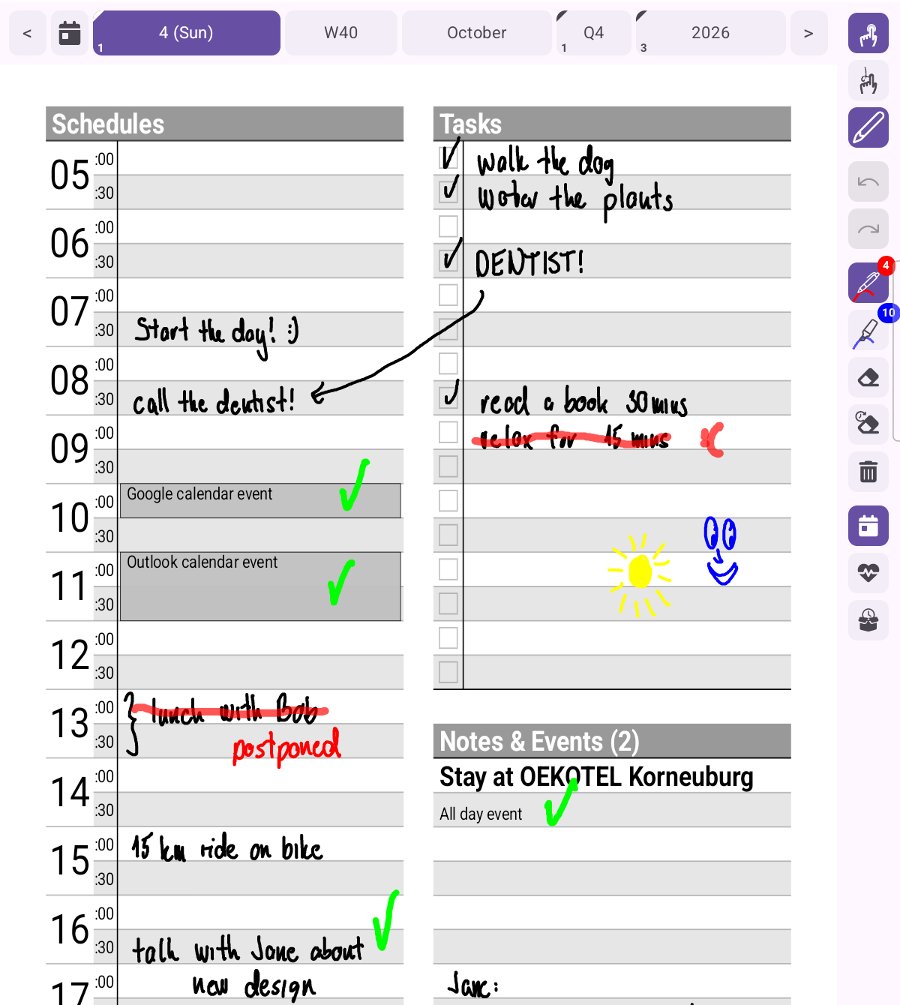
The Day page of Scribble Calendar puts everything time-boxing needs side by side. On the left, a schedule in half-hour rows that starts at the hour you choose in the settings – any hour from midnight to 7 in the morning. On the right, a task list with checkboxes and room for notes. The events of your device’s calendars are already in the schedule, so the fixed points of your day are there before you start.
How to time-box your day in four steps
- Empty your head. Write everything you want to get done today into the task list.
- Estimate. Next to each task, note how long it should take – honestly, not hopefully.
- Draw the boxes. Put each task into the schedule as a block, around your meetings and appointments. Leave some rows empty: the day always brings something you did not plan.
- Work the plan. When a block starts, do that task and nothing else. Tick it off when it is done, and cross out and move a block when the day changes.
When a box does not happen
Some days the plan does not survive lunch. Instead of erasing what you did not get to, use the procrastinator tool: it moves those strokes onto tomorrow’s page, where they wait for you.
Plan the week, box the day
Time-boxing works best with a weekly view above it. Use the Week page and its notes for the few things that must happen this week, then give them their boxes on each Day page. The Month and Quarter pages keep the longer goals in sight.
Look back at how it went
The health view of each day keeps track of your mood, sleep, water, meals and activity. Seen next to your boxes, it shows which days worked and why – and that is how the next week gets planned better.
Scribble Calendar runs on iPad and iPhone with Apple Pencil and on Android with a stylus: see the iPad and Android guides.