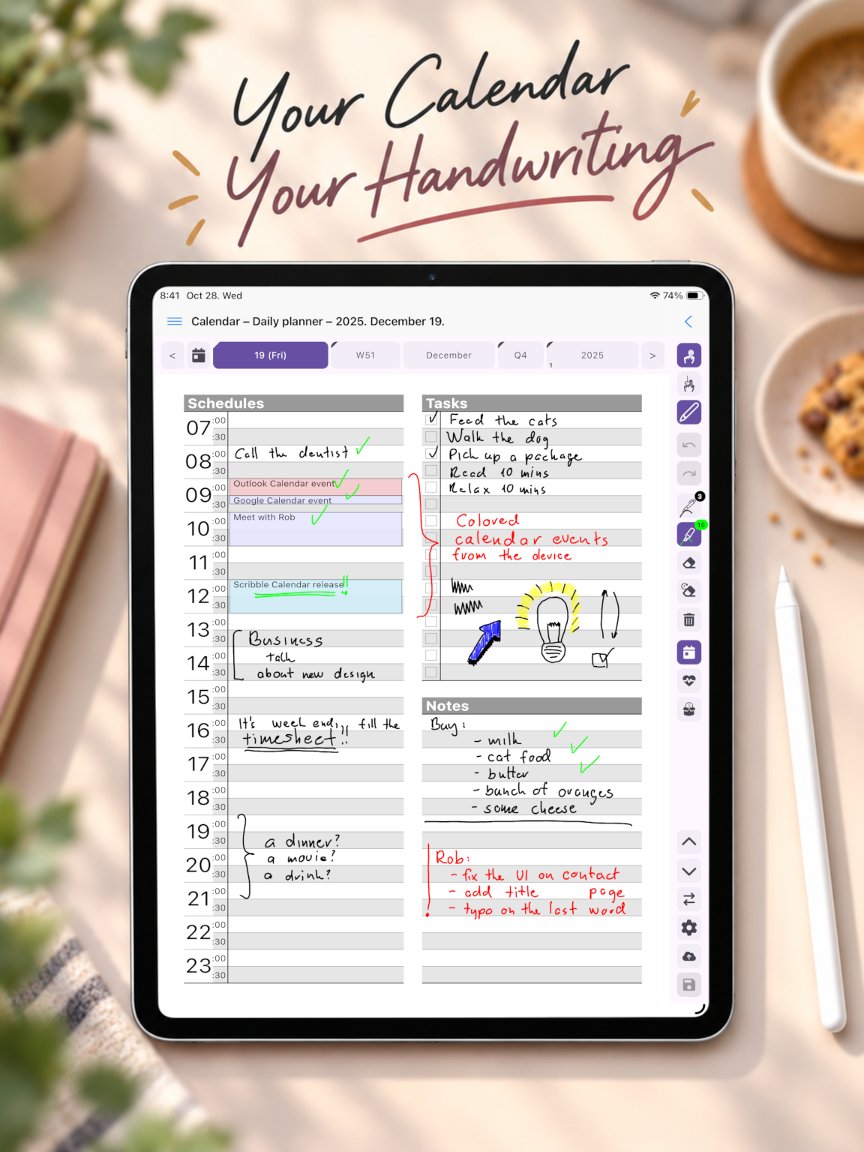
Why write your plans instead of typing them
Most calendar apps are built for typing: a form for every event, a field for every detail. That works for a dentist appointment, but not for the way you actually think about your week – the arrows, the circled priorities, the half-formed ideas in the margin. Scribble Calendar gives your iPad the freedom of a paper planner. You write and draw straight onto the page with Apple Pencil, and the page keeps exactly what you put on it.
One planner, from the whole year down to today
Every period has its own page: the year, the quarter, the month, the week and the day. The bar above the page shows where you are, and one tap takes you from the year to this week or from today back to the month. Behind every page there are note pages that never run out, for lists, sketches, mind maps or anything that does not fit a calendar grid.
The Day page is where most of the planning happens: a schedule in half-hour rows, a task list with checkboxes and room for notes. A health view on the same day keeps track of your mood, sleep, water, meals and activity.
Made for Apple Pencil
The toolbar beside the page holds everything you write with: pens in different styles, widths and colours, a highlighter, an eraser, and undo and redo. Pick a pen and write; there are no menus to open first. Your pages are saved as you go, so you can put the iPad down mid-sentence and pick up where you left off.
Your iPad’s calendars, beside your handwriting
The events of the calendars on your iPad appear on the pages next to what you have written: iCloud, Google, Exchange or any other account your iPad syncs. You see the fixed points of your day and plan around them by hand. Creating and editing events in the app is part of Premium, a one-time purchase.
Your pages stay yours
There is no account to create. Your planner pages stay on your iPad and are never uploaded to a server of ours. You can export a backup of your calendar at any time, and with the optional sync subscription your pages travel between your devices through your own iCloud Drive or Google Drive.
On iPhone, too
The same planner runs on iPhone, so the week you planned on the iPad is in your pocket as well. If you also use an Android tablet, Scribble Calendar is there too – see the Android guide.